Solitaire App: Classic Gameplay, Features and Android Download Guide
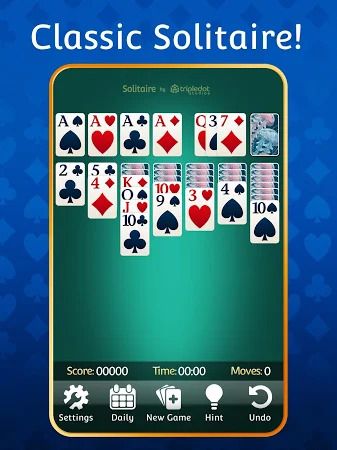
Solitaire remains a popular choice for players who enjoy quiet, strategy-based card games. Its familiar rules are easy to understand, but arranging a full deck into the correct order still requires patience and careful decisions. The Solitaire App discussed in this guide brings the classic Klondike format to Android, with different draw settings, scoring options, daily puzzles, and tools that help players when a game becomes difficult.
The app combines traditional card gameplay with several customization features. Players can change card faces, card backs, and table backgrounds, while daily challenges provide a separate puzzle to complete. Hints, undo, and auto-complete options make the experience more accessible to casual players who prefer a less demanding style of play.
There are also practical details worth considering before installation. The app is described as free with advertisements and optional purchases, so the playing experience may include promotional interruptions. This guide looks at its rules, features, interface, performance considerations, and what Android users should check before downloading it.
What Is This Solitaire Game?
This app is based on Klondike Solitaire, the familiar single-player card game played with a standard 52-card deck. The objective is to move all cards into four foundation piles, arranging each suit from Ace through King. Players gradually uncover hidden cards in the tableau while using the stock and waste piles to find useful moves.
The game includes two common card-draw settings: one-card draw and three-card draw. In one-card mode, a player turns over one card from the stock at a time, making it easier to access individual cards. Three-card mode reveals groups of three, which requires more planning because the useful card may not always be immediately available.
Players can also choose between standard and Vegas-style scoring. Standard scoring generally focuses on progress through the game, while Vegas scoring introduces a different points-based format. The exact scoring calculations should be checked in the app’s settings, particularly if you are unfamiliar with the Vegas variation.
Unlike multiplayer card games, this version is primarily designed around individual play. You can take time to consider each move, use assistance when necessary, and try different approaches without having to follow another player’s turn.
Solitaire Rules: How to Play Klondike
A standard Klondike game begins with seven tableau columns. The first column contains one card, the second contains two, and the pattern continues until the seventh column contains seven cards. Only the top card of each column is face up at the start. The remaining cards form the stock pile.
The main objective is to build four foundation piles, one for each suit. Each foundation starts with an Ace and continues upward in sequence: 2, 3, 4, and so on until King. A completed foundation contains all 13 cards of the same suit.
Within the tableau, cards must be arranged in descending order while alternating between red and black. For example, a black 9 can be placed on a red 10, while a red 8 can follow a black 9. When a face-down card becomes the top card of a column, it is turned over and becomes available for play.
The stock pile provides additional cards when no useful move is available in the tableau. Depending on the selected draw setting, the game reveals one card or three cards at a time. Cards from the waste pile can be moved to the tableau or foundations when they meet the required sequence.
A successful game requires more than moving cards whenever a legal option appears. Players should consider whether moving a card will uncover a hidden card, create an empty tableau column, or block a useful sequence. Kings are particularly important when opening an empty column because only a King can begin a new tableau stack.
Key Features and Game Modes
The app offers several ways to play and manage progress. Its main features are designed around the traditional Klondike format, with additional challenges and convenience tools for regular users.
One-Card and Three-Card Draw
The two draw settings provide different levels of difficulty. One-card draw is generally more forgiving because each stock action reveals a single card. It is a suitable starting point for people who are still learning the movement rules or prefer a more relaxed puzzle.
Three-card draw requires closer attention to the order of the stock and waste piles. A card may be visible but inaccessible until the cards above it have been played. This adds another layer of planning and can make a familiar layout more challenging.
Daily Challenge
Daily Challenge provides a separate puzzle for players who want a regular goal beyond standard games. The supplied information describes these puzzles as guaranteed solvable and mentions crowns, streaks, and monthly trophies as progression rewards.
The challenge calendar can help players keep track of completed days and ongoing streaks. It also gives the game a reason to revisit the app regularly without requiring users to compete against other players.
Daily content may require an internet connection to retrieve new puzzles or synchronize completion status. If the challenge does not load, check the connection before assuming the game itself is malfunctioning.
Extra Challenge Mode
Extra Challenge Mode allows players to enter a specific level number and revisit a particular layout. This can be useful when trying to solve a difficult board again or sharing a puzzle reference with someone else.
Having access to numbered layouts also gives experienced players a way to revisit specific challenges instead of relying entirely on random deals. The exact range of available levels and sharing options may depend on the current app version.
Hints, Undo and Auto-Complete
Hints can point out a possible move when the board becomes difficult to read. Undo allows players to reverse a previous action and try another approach. These tools are especially helpful for beginners who are still learning how moving one card can affect several columns.
Auto-complete serves a different purpose. When the remaining cards can be moved safely to their foundations and the board has reached the appropriate state, the feature can finish the remaining sequence automatically. It reduces repetitive tapping after the main puzzle has effectively been solved.
These assistance options make the game more forgiving, although players who want to improve their own decision-making may prefer to use hints selectively.
User Interface, Card Design and Customization
The game uses the familiar Klondike layout, with seven tableau columns, a stock pile, a waste pile, and four foundation areas. This arrangement will be recognizable to anyone who has played a physical or digital version of Solitaire before.
Card faces are designed to make ranks and suits easy to distinguish. Players need to identify cards quickly when several columns contain overlapping stacks, so readable symbols and clear contrast are more important than decorative details. The default green table provides a traditional appearance, while alternative backgrounds offer a change of scenery.
Customization options include card faces, card backs, and table themes. The supplied feature list mentions scenery, animals, seasonal designs, snowmen, dogs, and cats. Some visual options may need to be unlocked with in-game coins or through rewarded advertisements rather than being immediately available.
The interface also provides access to hints, undo, and auto-complete during active play. Card movements can be handled through dragging or tapping, giving players a choice between direct movement and quicker selection. A left-handed layout is available for users who prefer controls arranged for their dominant hand.
Both portrait and landscape orientations are supported. This gives players flexibility when holding a phone or using a larger screen, although the preferred layout will depend on device size and personal comfort.
Daily Progress, Statistics and Personal Records
Solitaire is often played in short sessions, but tracking progress can make repeated games more interesting. The statistics section records information about previous sessions, allowing players to review performance over time.
Depending on the metrics shown in the current version, this may include win rates and completion times. These records can help players compare their results and identify whether a particular draw mode or strategy works better for them.
Daily crowns, streak counters, and monthly trophies provide another form of progression. They do not change the basic card rules, but they give regular players additional targets. Someone who enjoys completing a puzzle each day may find this system more appealing than playing random boards without a longer-term goal.
Offline Play and Internet Requirements
The app is described as primarily a single-player game, with its core Solitaire engine operating locally on the device. This means standard card sessions may be available without a continuous internet connection, making the game suitable for travel or periods when mobile data is unavailable.
Not every feature necessarily works offline. Daily Challenge updates, online advertising, and synchronization of challenge progress may need network access. Cosmetic unlocks or other connected services may also depend on the app communicating with its servers.
If a standard game works but the Daily Challenge does not load, the difference may simply be the network requirement. Players should check which features are available offline rather than assuming every menu option will work without a connection.
Advertisements, Coins and In-App Purchases
The supplied information describes the Solitaire App as free to play with advertisements and optional in-app purchases. Its advertising formats include banners, full-screen advertisements between games, and rewarded videos that can provide coins or access to certain cosmetic items.
This model allows users to start playing without paying for the app itself, but advertisements can affect the pace of a session. Full-screen promotions may appear after completing a game or while navigating certain areas. Their frequency and behavior can vary by version, region, and advertising availability.
Some users may find these interruptions inconvenient, particularly if an advertisement takes time to close or temporarily affects the app’s responsiveness. If an ad appears frozen, avoid repeatedly tapping unfamiliar buttons or following unexpected redirects. Close the promotion using the available controls and return to the game only when the screen responds normally.
In-app purchases are described as covering ad removal, coins, hints, and cosmetic items. The reference information mentions an approximate one-time ad-removal price, but prices can change by country, platform, and store listing. Check the current purchase screen for the exact amount and terms before paying.
Players should also distinguish between optional convenience purchases and features required to complete a puzzle. Hints and themes may make the experience easier or more personal, but the basic Solitaire rules do not require buying them.
Performance, Storage and Battery Considerations
The reference material gives an APK size range of approximately 104–170 MB, depending on the installation source and device variant. This should be treated as an estimate rather than a guaranteed file size. The actual download may differ because of app updates, bundled resources, and the way the package is distributed.
The core card-game calculations are relatively simple compared with demanding 3D mobile games. Most of the visible activity comes from card animations, changing backgrounds, sound effects, and advertising components. Performance will still depend on the Android device, available memory, operating system, and background applications.
Some reported problems include occasional freezing, slower responses when advertisements load, and minor animation stutters. Extended sessions may also contribute to battery use, especially if the screen remains active continuously. These experiences are not necessarily shared by every device, but they are worth considering if you plan to play for long periods.
If the app becomes unresponsive, close it and reopen it before trying more complicated fixes. Check for available updates through a trusted source, ensure the device has enough free storage, and test whether the problem occurs during normal gameplay or only when advertisements appear.
Accessibility and Ease of Use
Several design choices make the game approachable for casual players. Large card faces, direct touch controls, hints, and undo options reduce the difficulty of learning the interface. The left-handed layout is another useful feature because it allows players to position the game controls more comfortably.
Orientation support gives users the choice of portrait or landscape play. This can be helpful on larger phones or tablets, where a wider layout may make the tableau easier to view. The best option depends on how much screen space is available and how the player prefers to hold the device.
There are still accessibility limitations to consider. The supplied information does not identify dedicated screen-reader support or a specific colorblind mode. Players who rely on those features should check the current app settings and store information before installation rather than assume that standard visual customization provides full accessibility support.
Solitaire Android APK: Download and Installation Guide
People searching for a Solitaire Android APK should confirm that they have found the intended Klondike Solitaire app before downloading an installation package. Several Android games use the general name Solitaire, and a similar title does not guarantee that the app has the same features or developer.
If the app is listed on Google Play, review the listing name, developer information, version details, permissions, and recent updates. If an APK is offered separately, use a source that can be independently verified. Avoid unfamiliar pages with multiple misleading download buttons or unexpected redirects.
Android may ask you to allow installation from an external source when opening an APK downloaded outside Google Play. Only grant that permission to the browser or file manager involved in a download you trust. After installation, you can review the setting again and disable access if it is no longer needed.
Before proceeding with a Solitaire APK Download, check the following:
- App identity: Confirm that the package matches the intended Solitaire game.
- File source: Use a trustworthy distribution channel rather than an unknown download mirror.
- Android compatibility: Check the required Android version. The reference material lists Android 5.0 or later, but requirements may vary by package.
- Available storage: Leave enough space for the installation and additional app data.
- Permissions: Review the access requested by the app and consider whether each permission is relevant.
- Update information: Check the version number and release details before replacing an existing installation.
The reference material identifies version 4.63.50, but this should not be assumed to be the latest release at the time of installation. Check the current store listing or verified distribution page for the available version.
Common Problems and How to Handle Them
The game does not open or freezes during startup. Restart the app and check whether your device has enough available storage and memory. If the issue continues, look for an update from the same trusted source used for installation.
Advertisements interrupt gameplay. Full-screen ads may appear between rounds or when accessing certain features. Use the visible close control when available, and avoid interacting with unexpected prompts that redirect you to unrelated pages.
The Daily Challenge does not load. Daily puzzles and progress synchronization may require an internet connection. Check your network and reopen the challenge section.
Cards do not move as expected. Confirm that the intended move follows the alternating-color and descending-order rules. If the move should be valid, try tapping the card instead of dragging it, or use undo to return to the previous board state.
The game uses more battery than expected. Reduce extended screen-on sessions, close other applications, and check whether background activity or advertising is contributing to power use. Battery consumption can differ between devices.
Advantages and Limitations of the Solitaire App
The app’s strongest point is its familiar Klondike gameplay with enough options to suit different playing styles. One-card and three-card draw modes provide different levels of challenge, while standard and Vegas scoring offer alternative ways to approach a session. Daily puzzles and statistics add goals for players who enjoy tracking their progress.
Hints, undo, and auto-complete make the game accessible to people who do not want every mistake to end a session. Left-handed controls and portrait or landscape support also add practical flexibility. Custom themes give players a way to change the appearance without altering the underlying rules.
The main drawback described in the source material is advertising. Full-screen promotions and rewarded videos can interrupt the quiet pace that many people expect from Solitaire. Some cosmetic options also require coins or rewarded ads, and optional ad removal may involve a purchase.
Accessibility is another area to check carefully. A left-handed layout is useful, but it does not replace screen-reader support or dedicated colorblind settings. Players who need those features should verify their availability before downloading.
Frequently Asked Questions
What type of Solitaire does this app offer?
The app is based on Klondike Solitaire, played with a standard 52-card deck. It includes one-card and three-card draw options, along with standard and Vegas scoring modes.
Can I play Solitaire offline?
The core single-player game is described as working offline. Daily Challenge updates, advertisements, and some connected features may still require an internet connection.
What is the difference between one-card and three-card draw?
One-card draw reveals one card from the stock at a time, making the game easier to manage. Three-card draw reveals cards in groups of three, which requires more planning because the card you need may not be immediately accessible.
Does the Solitaire App include daily challenges?
Yes. The described Daily Challenge provides a new puzzle each day and tracks progress through crowns, streaks, and monthly trophies. Loading new challenges or synchronizing results may require internet access.
Are hints and undo available?
The app description lists hints, undo, and auto-complete as gameplay assistance tools. These options help players identify possible moves, reverse mistakes, and finish boards when the remaining cards can be moved automatically.
Is the Solitaire App free?
The app is described as free with advertisements and optional in-app purchases. Purchases may include ad removal, coins, hints, and cosmetic items. Check the current store listing for exact prices and conditions.
Does the game support left-handed players?
A dedicated left-handed layout is listed among its features. The app also supports portrait and landscape orientations, giving users more flexibility when arranging the screen.
What Android version is required?
The supplied information lists Android 5.0 or later, although the requirement may vary depending on the installation package and release. Check the current listing before downloading.
How large is the Solitaire APK?
The reference material gives an approximate range of 104–170 MB. Actual file size can differ according to the distribution source, version, and device package.
Final Thoughts
This Solitaire App combines classic Klondike rules with daily challenges, different draw modes, scoring options, and tools for managing difficult boards. Its single-player format makes it suitable for short breaks or longer sessions, while customization and statistics provide additional reasons to return.
The main consideration is the advertising model. Full-screen promotions and optional purchases may interrupt an otherwise quiet card game, so players should review the current app information before deciding whether it suits their preferences.
If you are considering a Solitaire Android APK or searching for a Solitaire APK Download, verify the app identity, Android requirements, permissions, and version before installing. Once those details are clear, you can decide whether its classic gameplay and extra features are a good match for your mobile gaming habits.
Concurrently, while reviewing the credentials of this platform, you may also consider looking into Dragon Tiger game as a parallel reference. This platform provides its own set of safety guidelines and verified installation entry points, allowing you to examine its detailed review and official introduction page to make a well-informed comparison before any setup.